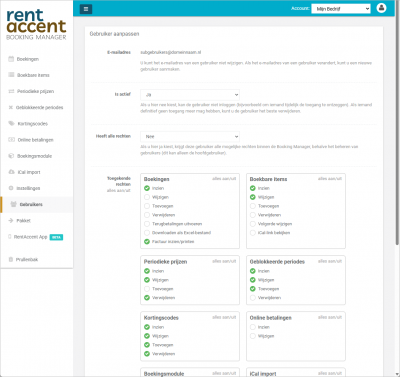
Do you work with multiple employees within your rental business? Then it is important that everyone has access to the booking system, while only seeing the features relevant to their role. A well-designed permissions system helps prevent mistakes, improves oversight, and allows your team to work more efficiently. In this article, you'll learn how to manage multiple users within a single booking system and why this is essential for a professional rental operation.
1. Prevent mistakes and unwanted changes
When multiple people use the same system without clearly defined permissions, the risk of errors increases significantly. Think of accidentally changing prices or deleting reservations. With user permissions, you decide exactly who can access and modify specific parts of the system.
2. Improve team efficiency
Not every employee needs access to every feature. By assigning responsibilities such as managing bookings, processing payments, or assisting customers, the system remains organized and everyone can work more efficiently.
3. Better visibility and ease of use
Users only see the features and menu items relevant to their role. This makes the system easier to navigate and reduces confusion, especially for new or temporary staff members.
4. Secure handling of customer data
Booking systems often contain personal and financial information. Restricting access to only the data employees need helps improve security and reduce risk.
5. Perfect for growing rental businesses
Do you operate multiple locations, employ several staff members, or work with seasonal workers? Then a booking system with user management becomes essential for maintaining structure and control.
In a professional booking system, you typically work with one primary administrator and multiple sub-users. The administrator manages the account and determines the permissions assigned to each user.
Managing users is simple and can be done in just a few steps:
1. Administrator with full control
The primary administrator has access to all areas of the system and can create, edit, and manage additional users.
2. Individual user accounts
Each user receives their own login credentials and password, ensuring better security and accountability.
3. Permissions by feature or section
You decide which menus, functions, and actions each user can access. Features that are not relevant remain hidden automatically.
4. Easy setup without technical knowledge
Adding users and configuring permissions is straightforward and does not require any technical expertise.
Is a multi-user booking system difficult to set up?
No. Modern booking systems are designed to make user management simple, allowing you to add users and adjust permissions without technical knowledge.
Can I give employees limited access?
Yes. You can define exactly which features and sections are visible to each user, helping you maintain control and security.
Is this suitable for small rental businesses?
Absolutely. Even smaller teams benefit from a clear permissions structure, reducing mistakes and improving efficiency.
Conclusion: Work Smarter with Multiple Users
A booking system with user permissions provides structure, security, and efficiency for your rental business. By assigning responsibilities and controlling access, you can reduce errors and create a more professional workflow.
Try RentAccent for free. Get immediate access to all features with no obligations and no payment details required.
 nederlands